Managing Corrections and Adjustments in Tills
Undo close Till
When adjusting a transaction that is associated with a till that has already been closed, you will receive the following error message:

In order to adjust past transactions that have been processed through an already closed till, you must first undo the closure of the till. This is available under Actions > Undo Close Till. In order to see closed tills, the Show Closed Tills checkbox needs to be selected.
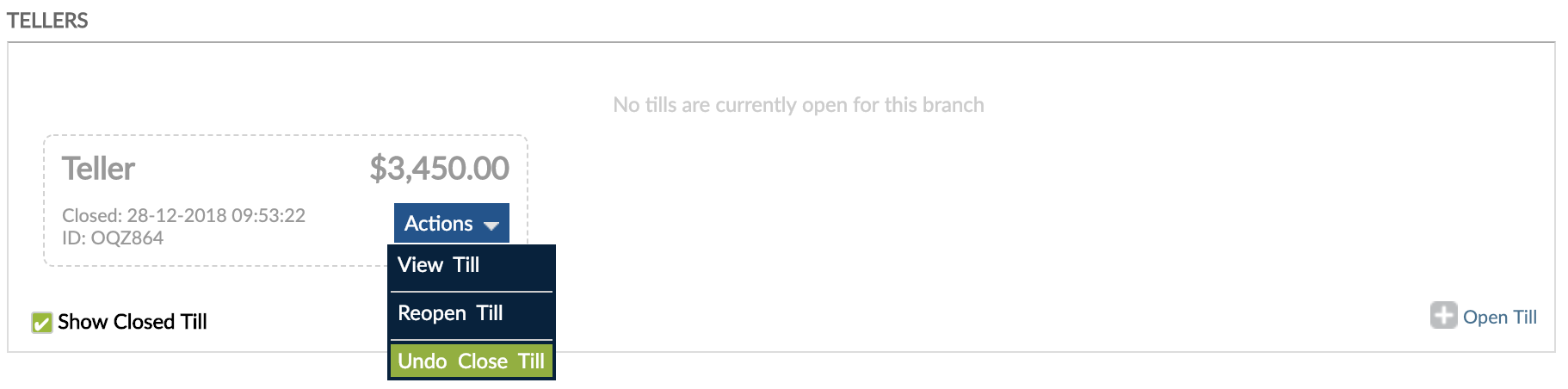
You can Undo Close Till only if you have no other opened tills, since you can have only one active till at any given time.
Adjust transactions
Once you undo the closure of the till, you can adjust the transaction.
You cannot adjust a transaction through the Tellering widget. Adjustments must be made directly from the account where the transaction was posted.
We recommend closing the till again after making the adjustment.
To read more about how to adjust transactions, please go to Adjusting Transactions.