Incoming and Outgoing Payment Messages
This feature is scheduled for deprecation. We recommend contacting Mambu Support to discuss alternative options.
The Mambu Payment Gateway groups information about payment messages under two menu items, Incoming and Outgoing.
The Incoming menu item contains information about incoming payment messages. This includes all the pending payment messages as well as the those that have already been processed by the scheduler.
Payment messages
Pending payments
For both incoming and outgoing payment messages, the payment message will first enter the pending state and once the scheduler runs if will move to the list of processed payment messages. For more information about schedulers, see Schedulers.
Payment message detail screen
In any list of payment messages, you may select a payment message to view the payment message detail screen. Here you can see more detailed information about the SEPA message (XML).
In the table we provide a list of the fields in the XML.
Alerts
PREVIOUS CONTENT
Incoming / Outgoing
The incoming / outgoing menus are used to monitor received/sent payment messages. When clicking this menu, the user is prompted with two sub-menus:
- SEPA
- Alerts
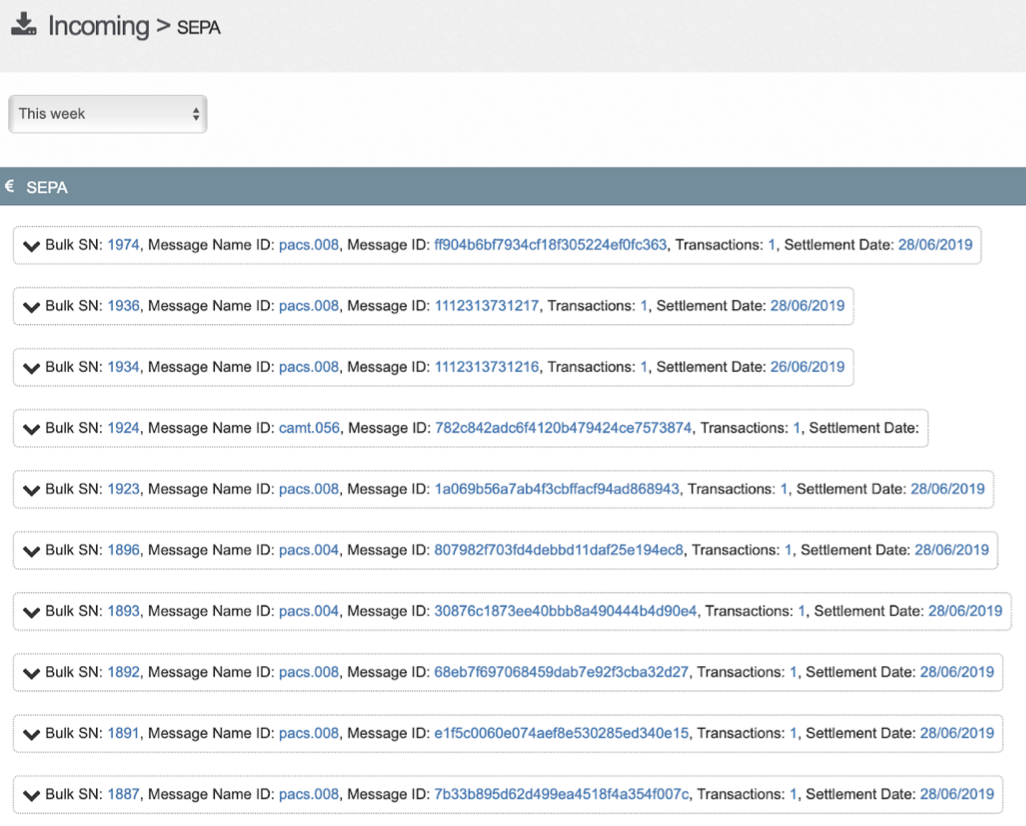
The sub-menu SEPA gives users a view on the incoming / outgoing SEPA messages:
Transactions List
Each row represents one of the following SEPA messages:
- Pacs.008
- Pacs.004
- Pacs.002
- Camt.056
- Camt.029
The list provides the following information on a message:
- System ID
- Message type
- Message ID
- Number of transactions inside a given message
- Settlement date
Clicking a single row will provide users more information on the payment message:
- Transaction number
- Message ID
- Status
- Amount
- Creditor IBAN

By clicking on the arrow of each row the SEPA message (xml) will be seen in full on the detail screen.
For more information about these messages, please refer to the 2019 SEPA Credit Transfer rulebook version 1.2 which you can find at the website of the [European Payments Council](https://www.europeanpaymentscouncil.eu/
The fields displayed are relevant for the end users and provide useful information in case of investigation or customer requests.
List row detail
Clicking a single row will redirect users to the full details of the payment message:
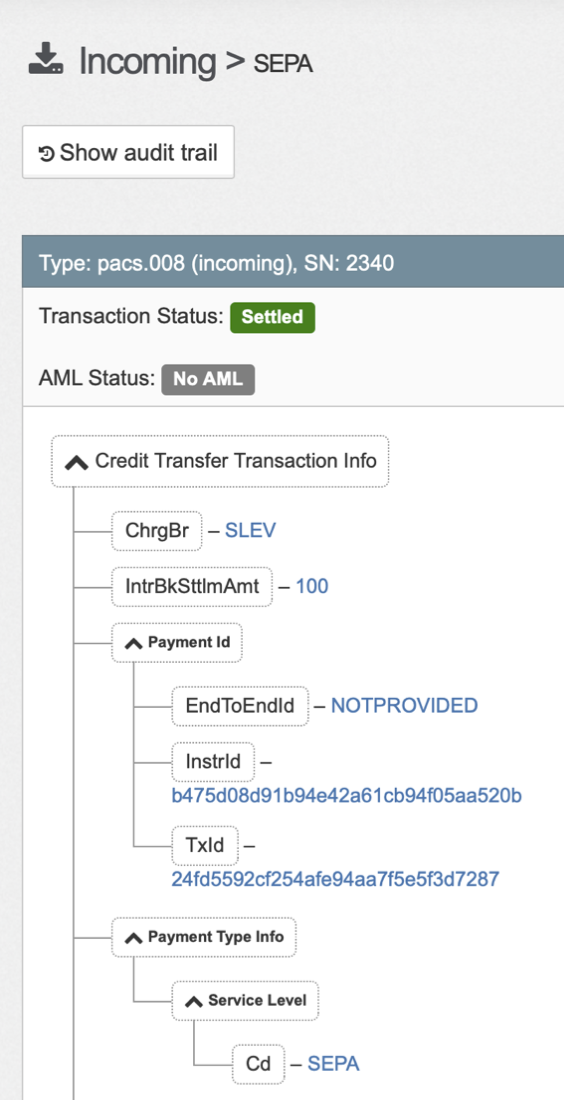
The image above represents a SEPA message (xml) and can be seen in full in this detail screen. For more information, please refer to the European Payments Council's 2019 SEPA Credit Transfer rulebook version 1.2.
The fields displayed are relevant for the end users and provide useful information in case of investigation or customer requests
For ISO 20022 fields, the XML Tag is indicated in parentheses.
| Field | Description |
|---|---|
| Message ID | Unique reference generated by the payment engine and used to identify a single message in the system |
| Message Identification (MsgId) | Message reference created by the sender and forwarded in the SEPA message |
| Message type | The type of message sent/received e.g pacs.008 |
| Transaction status | Status of the message assigned by the payment engine after processing: rejected, pending, Sent |
| Reception date | Date at which the message is received in the payment engine. In search screens, users can enter From and To reception dates |
| Sending party (InstgAgt) | BIC of the sending Bank |
| Receiving party (InstdAgt) | BIC of the receiving Bank |
| Order status | Status of the order assigned by the payment engine after processing: rejected, processed, pending, on hold. Order status depends on the status of the message. An order is automatically rejected if the corresponding message is rejected. |
| Order Category Purpose (PmtTpInf, CtgyPurp) | It provides information about the purpose of the order and may trigger special processing. So interesting for the end user |
| Execution date | Date at which the order is really executed. Requested and real execution dates are the same most of the time. |
| Order amount | Amount of the order |
| Interbank Settlement Date (IntrBkSttlmDt) | The date at which the order / transaction is settled |
| Interbank Settlement Amount (IntrBkSttlmAmt) | Total amount of the transactions contained in the order or message (e.g if pacs.008 has 2 payments of 10 then IntrBkSttlmAmt=20 |
| Debtor name (DbtrNm | Name of the debtor |
| Debtor Account DbtrAcct (Debtor IBAN) | IBAN of the debtor |
| Debtor Agent (DbtrAgt) | Debtor bank BIC |
| Beneficiary name (CdtrNm) | Beneficiary name |
| Creditor Agent (CdtrAgt) | Beneficiary Bank BIC |
| Creditor Account (CdtrAcct) | IBAN of the beneficiary |
| Transaction ID (TxId) | Unique reference generated by the payment engine and used to identify a single transaction in the system |
| Interbank Settlement Amount (IntrBkSttlmAmt) | This is the transaction amount |
| End To End Identification (EndToEndId) | It is generated by initiating party to unambiguously identify the transaction. Good to have as search criteria since users can easily find a transaction with it |
| Transaction Status | Status of the transaction assigned by the payment engine after processing: rejected, processed, pending, on hold. Transaction status depends on the status of the order. A transaction is automatically rejected if the corresponding order is rejected |
| Original transaction ID | This is available in R-transactions only. It provides for example the transaction ID of the original transaction linked to a return. |
For more information about these messages, including a complete set of fields, please refer to the 2019 SEPA Credit Transfer rulebook version 1.2 which you can find at the website of the European Payments Council.
Alerts
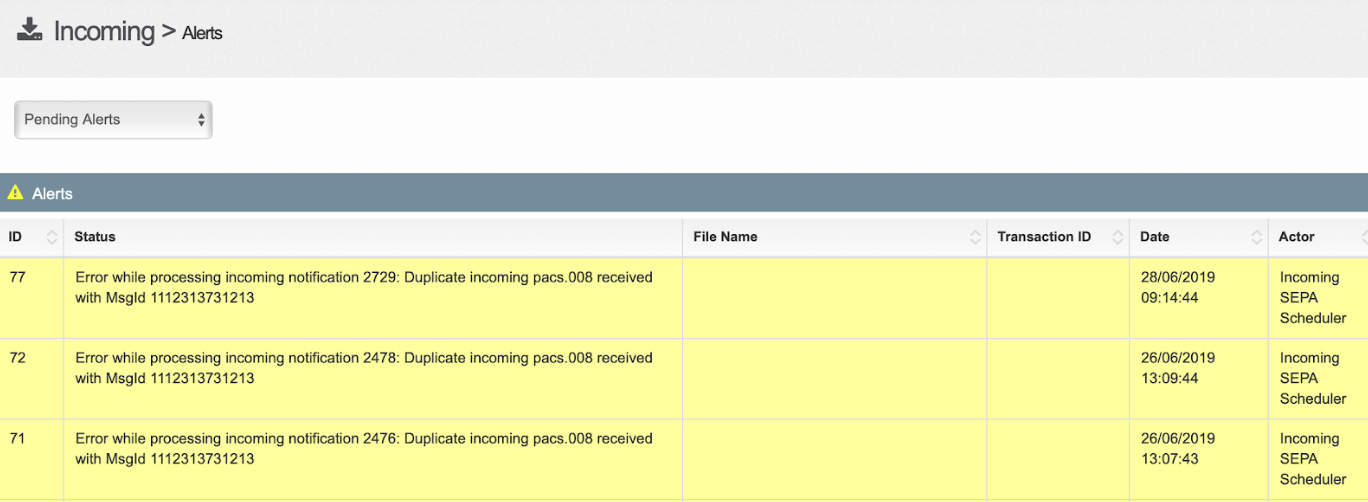
The sub-menu Alerts, gives users a list of alerts for the SEPA messages. The section provides information on the error so that the user can trigger actions to resolve the issue.
The alerts section can be found both on the outgoing and incoming menus.
Pending
In this section you will see messages that are pending to be sent: either they require manual input before they can proceed the payment flow, such as outgoing returns requests or replying to these return requests positivily or negativily or messages that cannot be sent given the day the messages were generated is a holiday.
Outgoing returns waiting to be accepted or rejected:
-2481eeb5d0e13397904aa872a2bca009.png)
Pending pacs.008 given a payment was sent on an holiday
-26fdccaac95df9298a183f9c448d51dc.png)