Organization Contact Details and Time Zone
You can edit all the information related to your organization's contact information and general settings.
This element can also be configured using Configuration as Code (CasC). For more information, see Configuration as Code.
Managing organization details using Mambu UI
To add or edit the organization's contact information and time zone:
- On the main menu, go to Administration > General Setup > Organization Details.
- Enter all the necessary information. See below for more information on the fields.
- Select Save Changes.
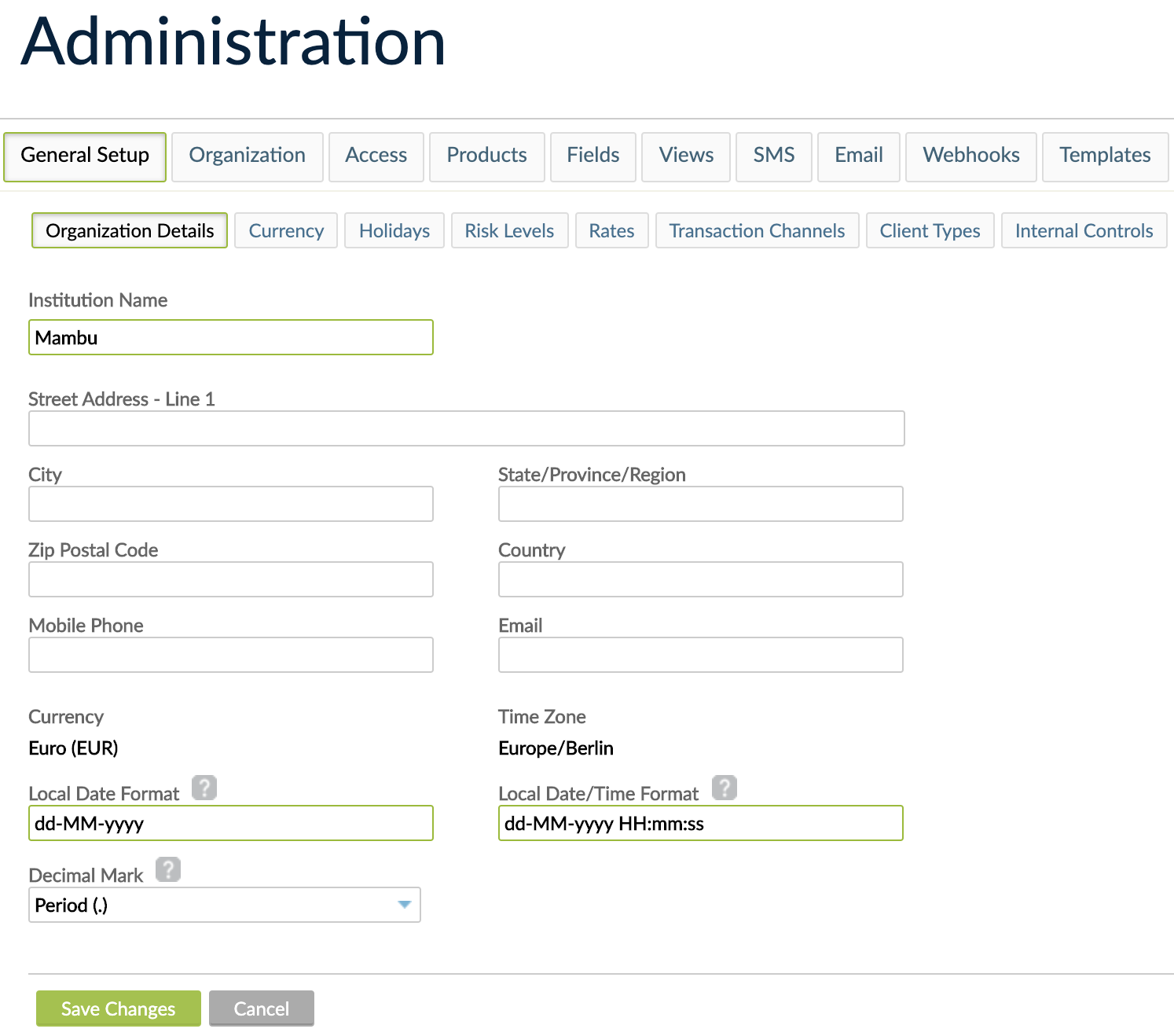
Fields in Organization Details
Fields shown with a green outline are required. They are also indicated below.
Institution Name (required)
Enter the name of your institution which will be displayed in left corner of the top bar.
Contact Details
Enter the contact details of your institution:
- Street Address Line 1
- City
- State/Province/Region
- Zip Postal Code
- Country
- Mobile Phone
Currency
The base currency of the organization. For more information, see Currencies.
Time Zone
Define the organization's local time zone. Note that your organization's time zone controls when various automated processes occur, such as End-of-Day processing and automated notifications.
For more information, see End-of-Day Processing and Cron Jobs and Automating Notifications for more information.
Local Date Format (required)
The pattern that determines the date format to be used for Mambu dates. All dates displayed in the Mambu UI will use the format defined here.
For more information on how to enter your format specification, see Date and time formatting.
Local Date/Time Format (required)
The pattern that defines the date and time format to be used for Mambu timestamps. All dates and times displayed in the Mambu UI will use the format defined here.
For more information on how to enter your format specification, see Date and time formatting.
Decimal Mark
Define whether to use a period . or a comma , as a decimal mark.
Date and time formatting
The following characters that are accepted when defining the date and date/time formats.
| Symbol | Meaning | Presentation | Example |
|---|---|---|---|
| y | year | Number | 2009 |
| M | month in year | Text/Number | July/07 |
| d | day in month | Number | 10 |
| h | hour in am/pm (1-12) | Number | 12 |
| H | hour in day (0-23) | Number | 0 |
| m | minute in hour | Number | 30 |
| s | second in minute | Number | 55 |
| S | millisecond | Number | 978 |
| w | week in year | Number | 27 |
| W | week in month | Number | 2 |
| k | hour in day (1-24) | Number | 24 |
| K | hour in am/pm (0-11) | Number | 0 |
| ' | escape for text | Delimiter | (none) |
| ' | single quote | Literal | ' |
Time format specification examples
| Pattern | Example output |
|---|---|
| dd.MM.yy | 30.06.09 |
| yyyy.MM.dd hh:mm:ss | 2009.06.30 08:29:36 |
| H:mm | 8:29 |
| H:mm:ss:SSS | 8:28:36:249 |
| dd.M.yyyy | 26 October 2020 |