Payment Methods for Declining Balance Equal Installments (DBEI) Loans
For both dynamic and fixed term loans you can choose a payment method based on a declining balance with the borrower paying the loan down in equal installments. This type of loan allows a few different payment methods, which will have an impact on the schedule.
To select a payment method for the declining balance equal installments loans:
- In the main dashboard, go to Administration > Products > Loans.
- In the bottom-right corner, select New Loan Product.
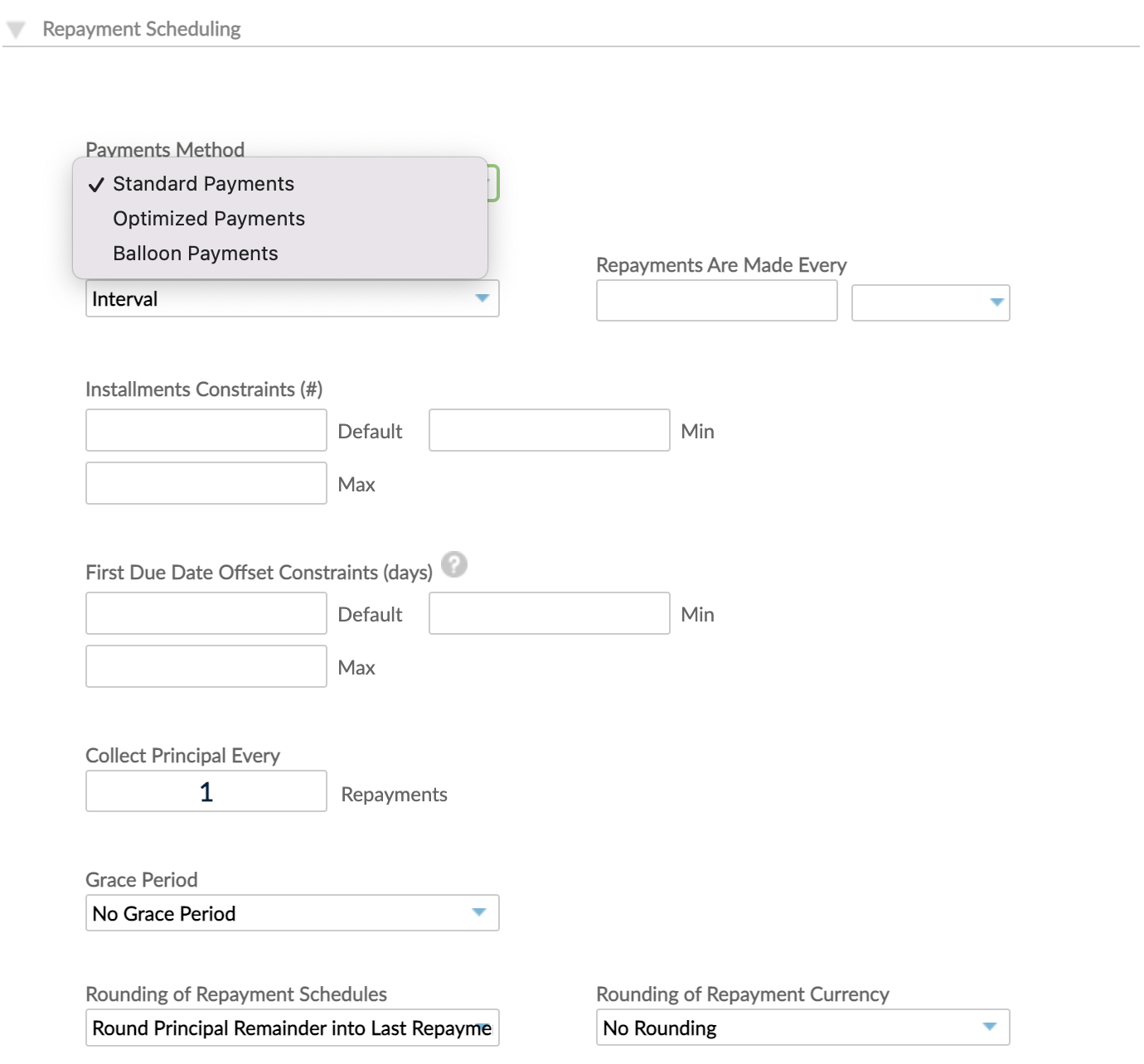
- In the Creating a new loan product form, go to the Repayment Scheduling section and, under Payment Method, choose one of the following methods, explained on this page.
- Standard Payments, available for both Fixed and Dynamic Term loan products.
- Balloon Payments, available for both Fixed and Dynamic Term loan products.
- Optimized Payments, available for Dynamic Term loan products.
- Payment Plan, available for Fixed Term loan products.
- Aftering configuring the rest of the product, select Save Product.
Standard payments
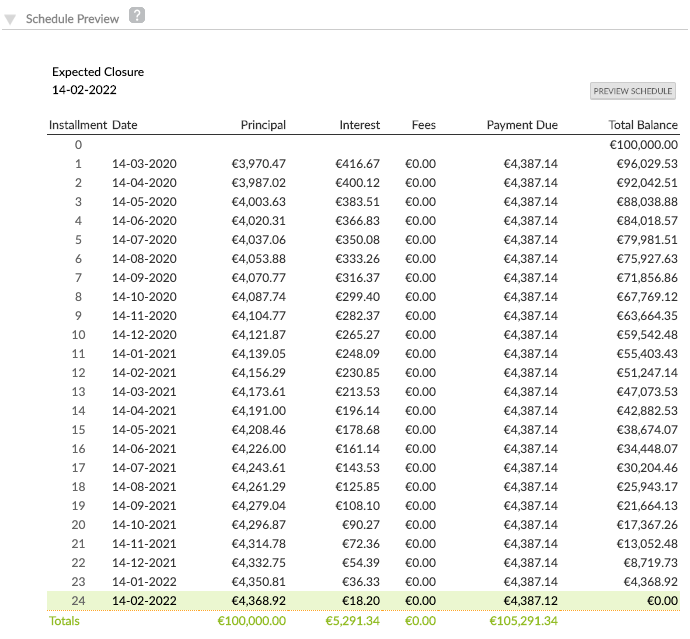
The Standard Payment method allows you to simply divide the total amount due (including interest) by the number of installments to be made to pay down the loan. If it is not possible to divide cleanly and rounding has been enabled for this product, the last payment may be slightly smaller or larger than the previous installments by a few cents.
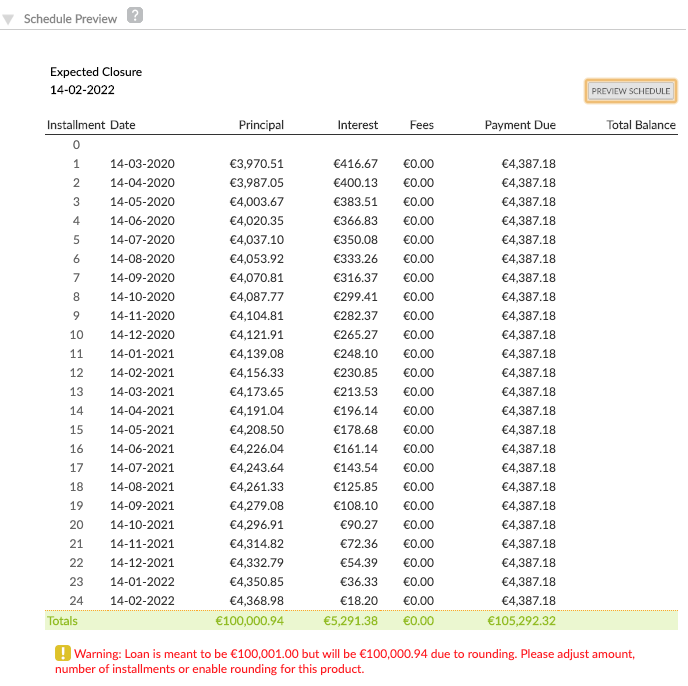
When rounding has not been enabled for the product and the principal cannot be cleanly divided, you will receive a warning, giving you the option of changing the amount or the number of installments to ensure the collection of the entire amount.
Example
In the following example, rounding has been enabled for the product and the last installment is slightly different than the rest of the installments.
In the following example, rounding has not been enabled for the product and the last installment is exactly the same as the rest of the installments.
Balloon Payments
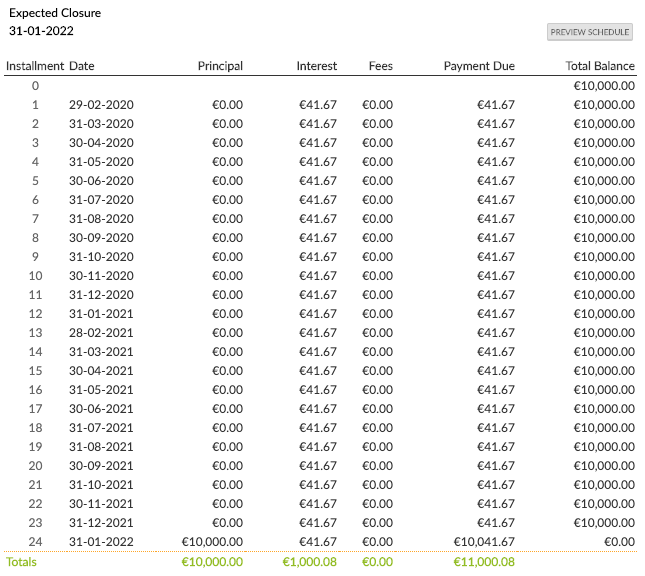
The Balloon Payments method allows you to offer borrowers a fixed repayment amount each month with the balance of the loan to be paid off in the final installment - which could be a lot bigger. These kinds of loans are typically targeted at businesses as a large final payment to settle the loan may be beyond the reach of an individual client.
When you create a loan account based on this product you will be able to set the monthly payment amount and Mambu will calculate the schedule. For dynamic loans, the schedule, including the amount of the final payment will be recalculated based on any overpayments made by the borrower.
Examples
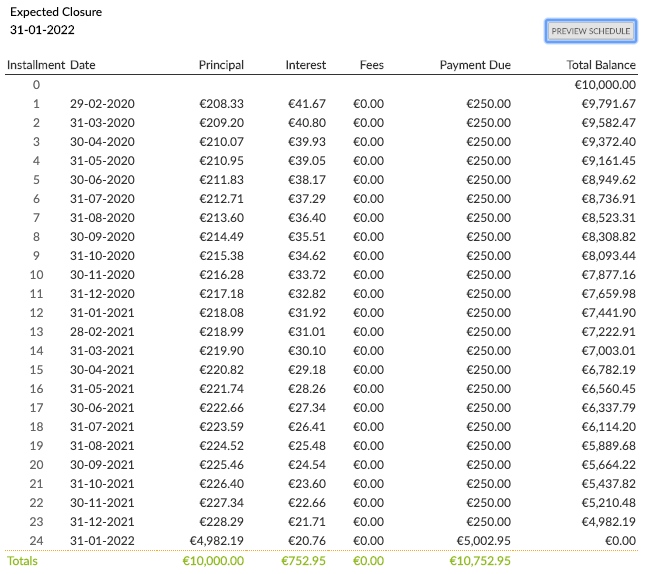
The following is an example showing balloon payment making interest-only payments and settling the whole loan with a large lump sum at the end.
The following is an example showing balloon payment schedule paying down interest and some of the principal with the final payment being around half of what was initially lent to the client.
Payment Plan
The Payment Plan method allows you to specify a periodic payment for a specific number of installments with rates being able to rise or fall with subsequent installments.
Example
For example, you can change the interest rate throughout the life of the loan.
- You can reduce the interest rate by 1.5% each year.
- You can have 10% interest rate for the first three months of the loan, and after this period decrease it to 8% and continue with this rate until the loan reaches maturity.
When you create a loan account, you define your payment plan, as in the following example.
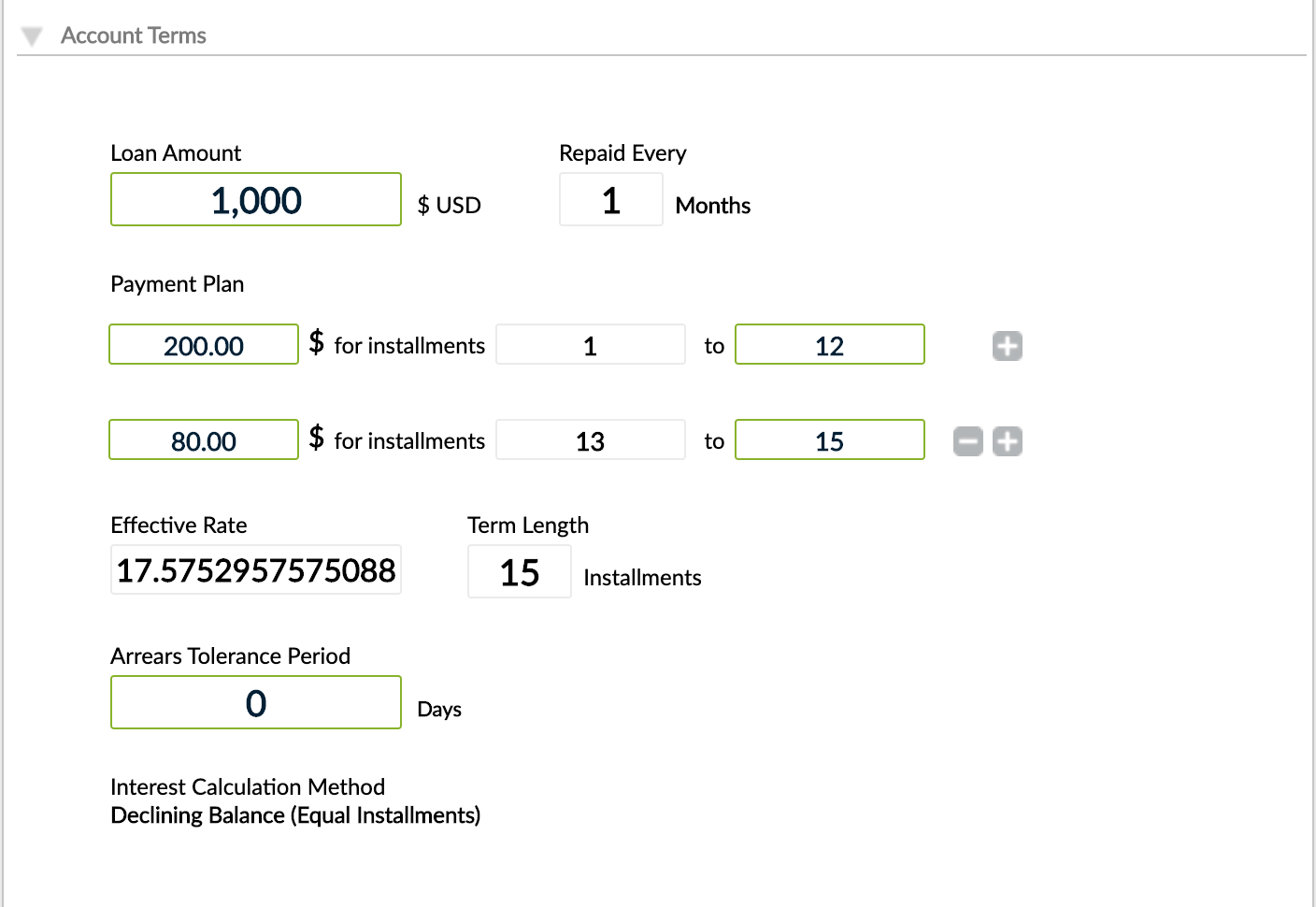
The interest rate is computed based on the Internal Rate of Return (IRR) formula.
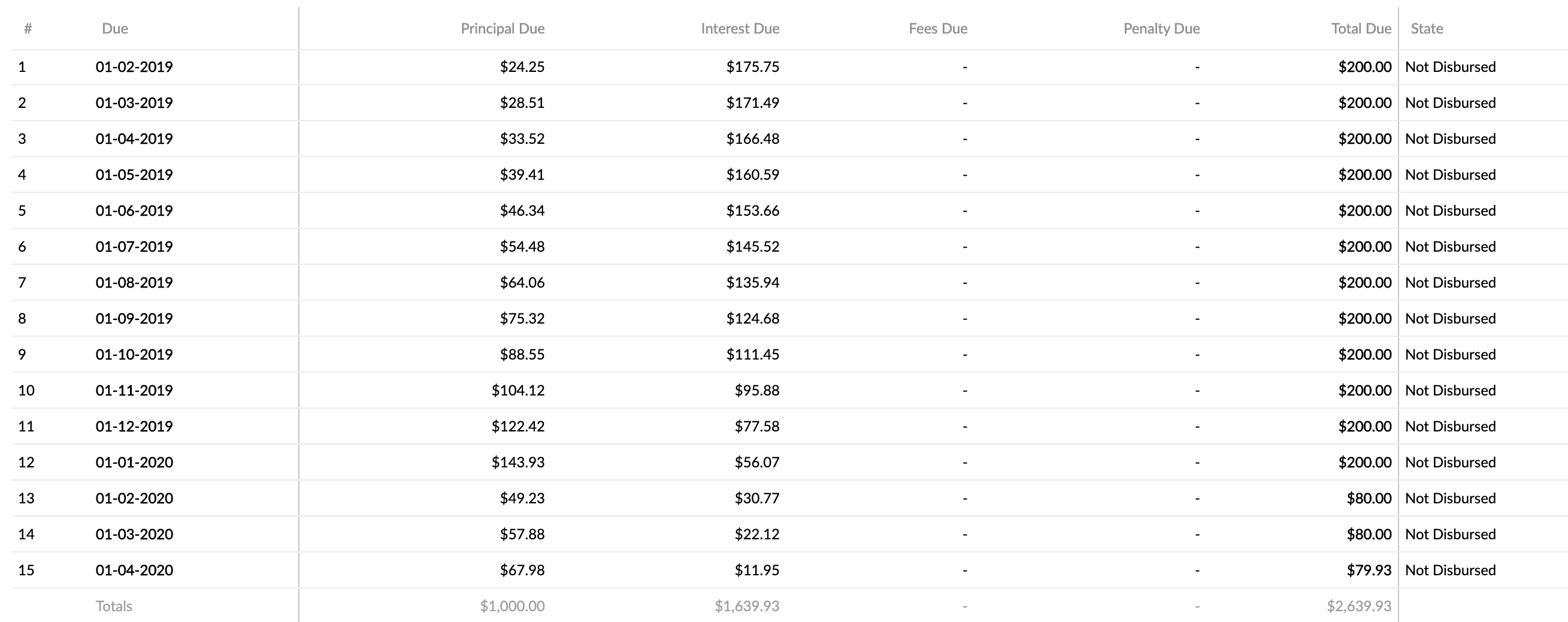
In the image below we have illustrated the schedule for the loan account defined in the example above.
Optimised Payments
If you wish to use this new computation method, please get in touch with your Mambu Customer Success Manager or contact us through Mambu Support to discuss your requirements.
The Optimised Payments method allows you to have a minimum deviation in the last installment when the first installment period is different from the rest of the repayment periods.
The optimised payments method runs multiple iterations to find the best Periodic Payment (PMT) or total due and to generate the optimum schedule with minimum deviation and maintain it on the lower side. The deviation occurs due to the rounding of the repayment currency.
The optimised payments method is applied when creating or activating a loan account and will be reapplied when any changes are made to the schedule due dates or the number of installments.
Example
In the following example with optimized payments, the last installment is only one cent smaller than the rest of the installments.
Loan amount: USD1000 Interest rate: 100% Disbursement date: May 1, 2023 First repayment date: July 1, 2023
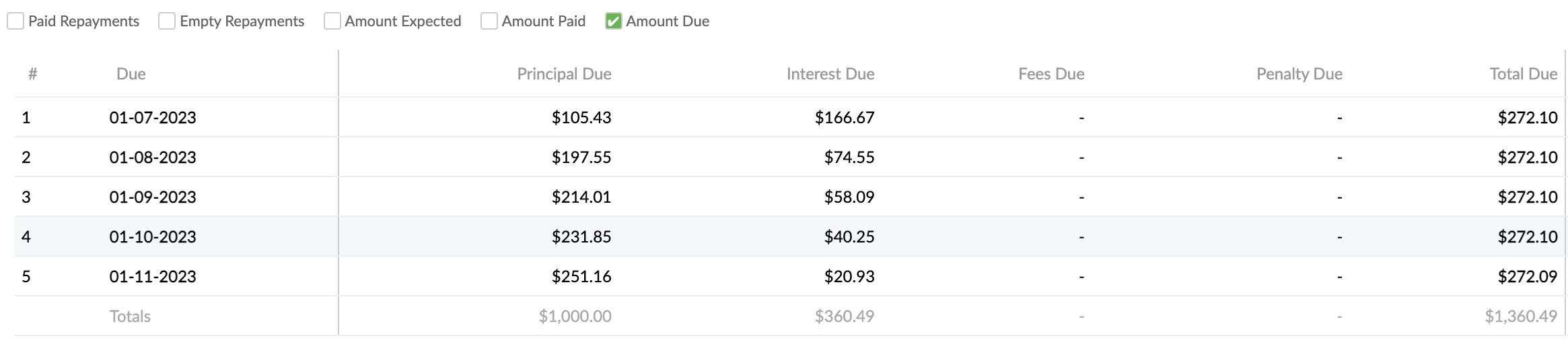
In this example, the first installment contains more interest because of the two-month period between the disbursement date and the first repayment date.
Equal installments for a longer first period across the loan schedule for simple interest
This feature is not available by default.
If you would like to request access to this feature, please get in touch with your Mambu Customer Success Manager to discuss your requirements. For more information, see Mambu Release Cycle - Feature Release Status.
In many regions, loan schedules commonly feature equal installments, with the first repayment typically due 2-3 months after disbursement. During this initial period, substantial interest can accrue, particularly with high interest rates, potentially causing the interest to exceed the total first installment due.
To address this, a specific implementation is available for certain product configurations. If the calculated interest on an installment surpasses the total amount due, the excess interest will be carried forward to future installments. Mambu will cap the interest charged for that installment at the total amount due, meaning no principal will be collected. This process continues until the interest amount is less than the total due, at which point principal collection can begin.
This feature applies to the following product configuration:
- Product Type: Dynamic Term Loan
- Interest Calculation: Declining Balance Equal Installments
- Calculate Interest using: Principal Only
- Payment Method: Optimized
- Pre-Payment Allocation: On Upcoming Pending Installment Only
- Pre-Payment Recalculation: Reduce Number of Installments
- Mark Principal as Paid When: Principal Expected is Paid
- Overdue Payments: Increase the Overdue Installments
The Equal Installments for longer 1st period checkbox will appear in the Repayment Scheduling section of the Loan Product creation form when the above product configuration is used.

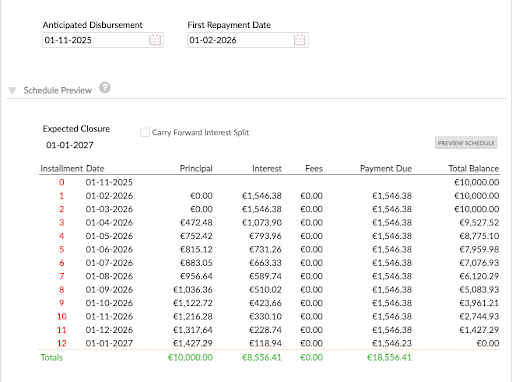
The toggle is activated when the calculated installment exceeds the total amount due. This can be reviewed during Loan Account configuration using the Preview Schedule. A Carry forward interest split checkbox has been added to display the amount of interest carried over to subsequent installments. The following examples show the difference between the two options:
Without selecting the checkbox:
With the checkbox selected:
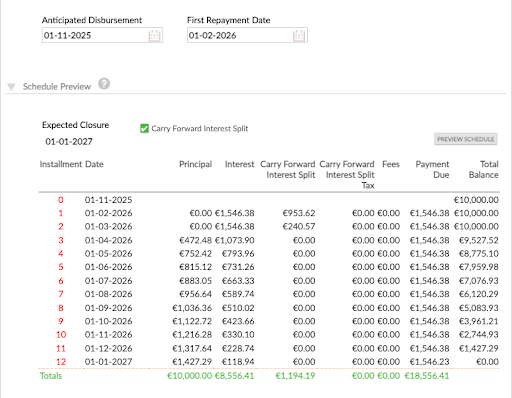
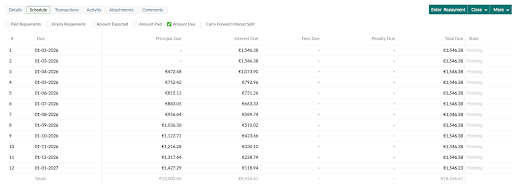
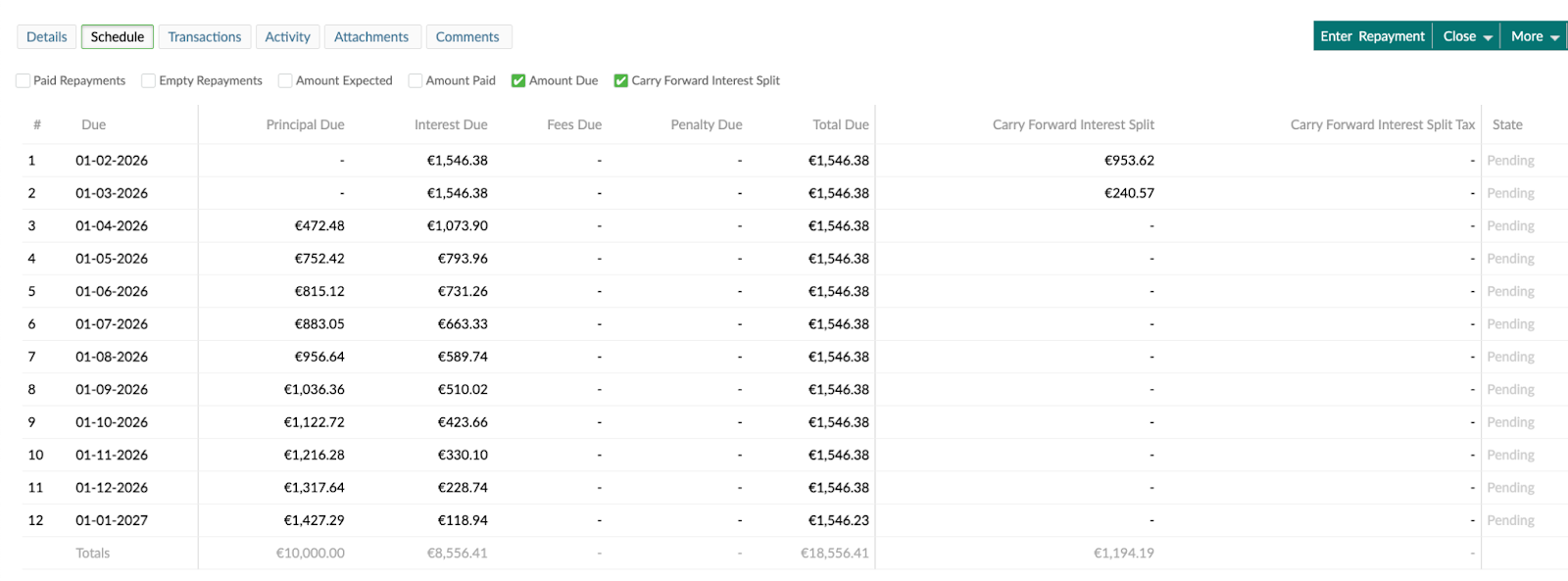
Selecting the Carry forward interest split checkbox will show the carried-forward interest amount in the Schedule tab. See the examples below.
Without selecting the checkbox:
With the checkbox selected:
This implementation is currently only supported on the product configuration mentioned above. Payment holidays cannot be defined when the Equal Installments for longer 1st period checkbox is enabled.